Insight Office Apps
Slides become training videos.Documents speak 47 languages.
Drop a PowerPoint to generate an AI-narrated training video. Drop a Word / Excel / PPTX / PDF for layout-preserving translation across 47 languages, with your own glossary and plain-Japanese rewriting — built with Japan's specified-skill workforce 2027 program in mind.
Free version available. No credit card. 30-day Pro trial also offered.
Built by Harmonic Insight Inc. (28 years in IT consulting, 100+ engagements)
Free Download
Just download and run — no email or license key.
30-day Full Trial
All features unlocked for 30 days, then a free view-centric tier.
Buy License
¥20,000/year (Personal) or ¥50,000/seat/year (Business).
47 langs
AI narration + translation
6 engines
DeepL / Claude / GPT / Gemini / Azure / Google
BYOK
Your own AI keys · local processing
Available across Microsoft, Google & Apple platforms
✓ 11 apps live on Google Play / App Store & Microsoft Store coming soon

CONSULTING ORIGIN
Built from problems we kept seeing on consulting frontlines
Working in consulting across construction, manufacturing, and logistics, we kept running into the same patterns: outsourcing training videos, navigating language barriers, and looping ChatGPT copy-paste sessions. Insight Office Apps is what we designed to handle these in a single Windows desktop app.
See our current 2 productsThe two products available today
Two desktop apps where AI works directly on Office files. Designed from problems we kept seeing on consulting engagements.
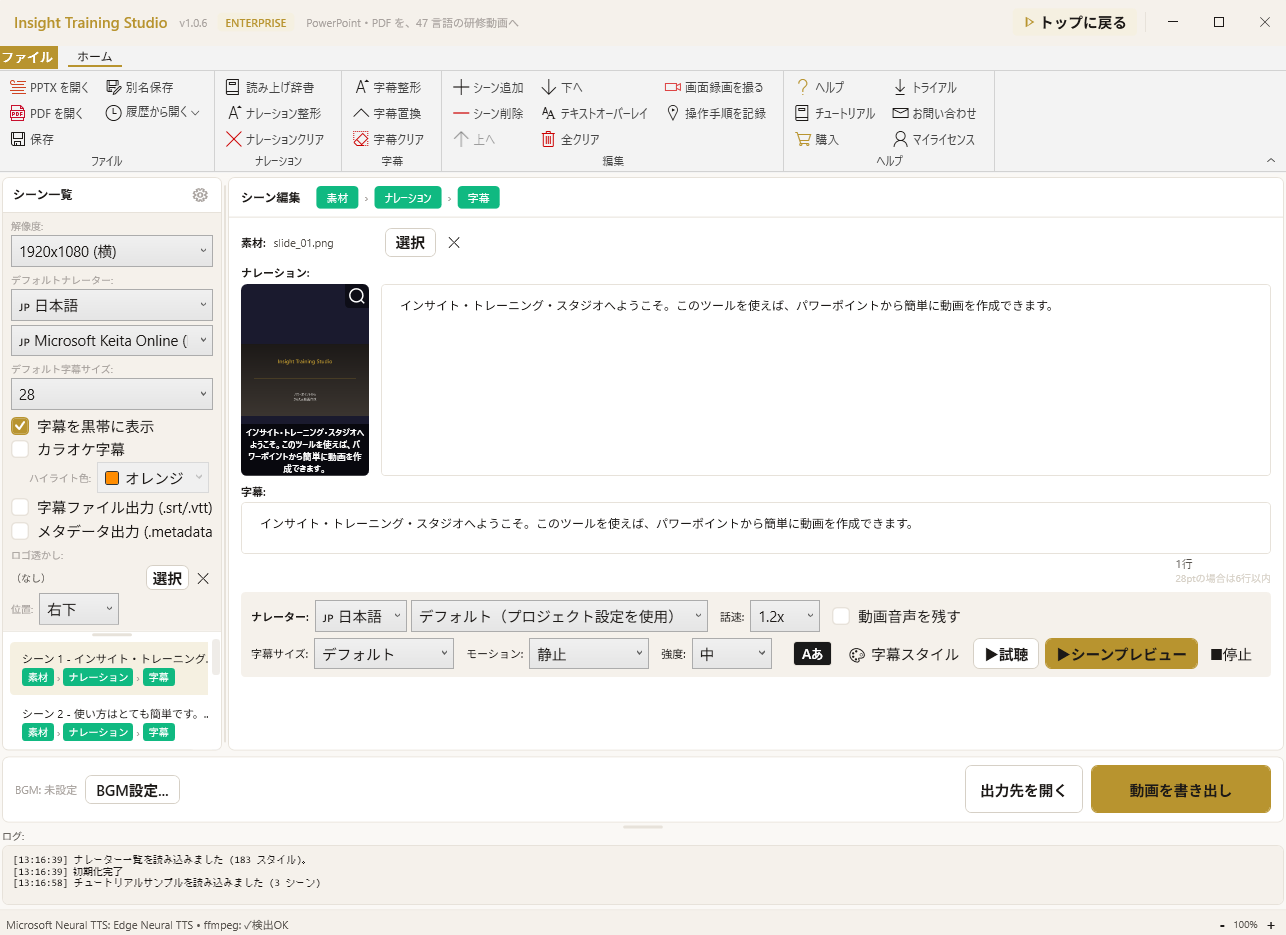 Available
Create a PowerPoint, Get a Training Video
Speaker notes become AI narration; slides become video frames automatically. 30+ VOICEVOX voices and 47 languages — multilingual rollout is one click.
Learn More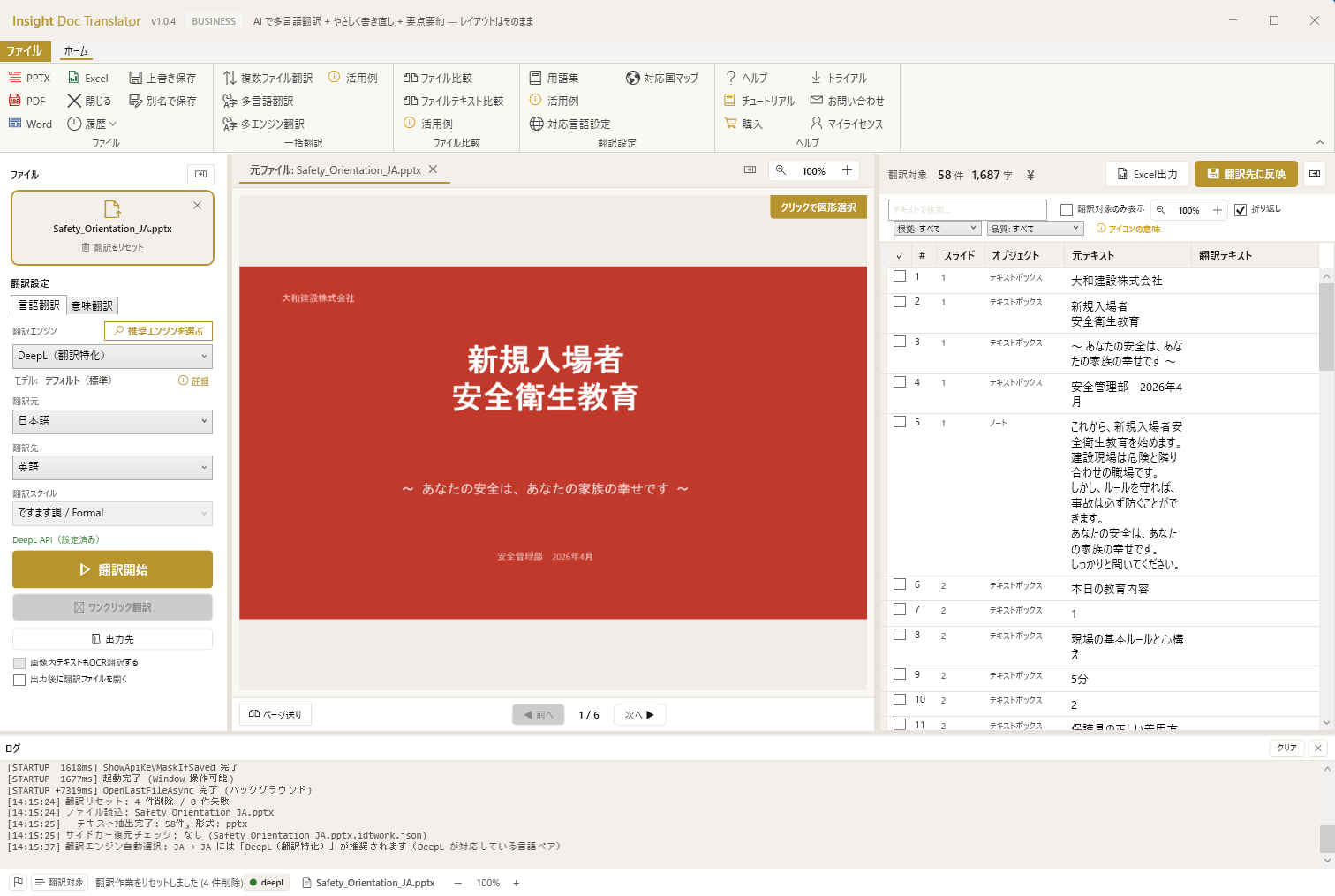 Available
Open Any File → 47 Languages + Plain Japanese
Three translation axes: cross-language (47 langs × 6 engines) + intra-language (plain Japanese / summary / honorific) + automatic furigana. Ready for Japan's specified-skill workforce program (April 2027).
Learn MoreInsight Business Suite
Excel + Word + PowerPoint + Video + Translation + Insight Office — your AI concierge edits them directly
Insight Training Studio
Create a PowerPoint, Get a Video. No Recording, No…
- PowerPoint, PDF, Word, or Excel → narrated MP4 — speaker notes become AI narration automatically
- 4 TTS engines — Edge Neural Voices (47 languages), VOICEVOX (Japanese), Windows OneCore (offline), ElevenLabs (BYOK voice cloning)
- Multi-scene editor — set voice, subtitle, and timing per scene
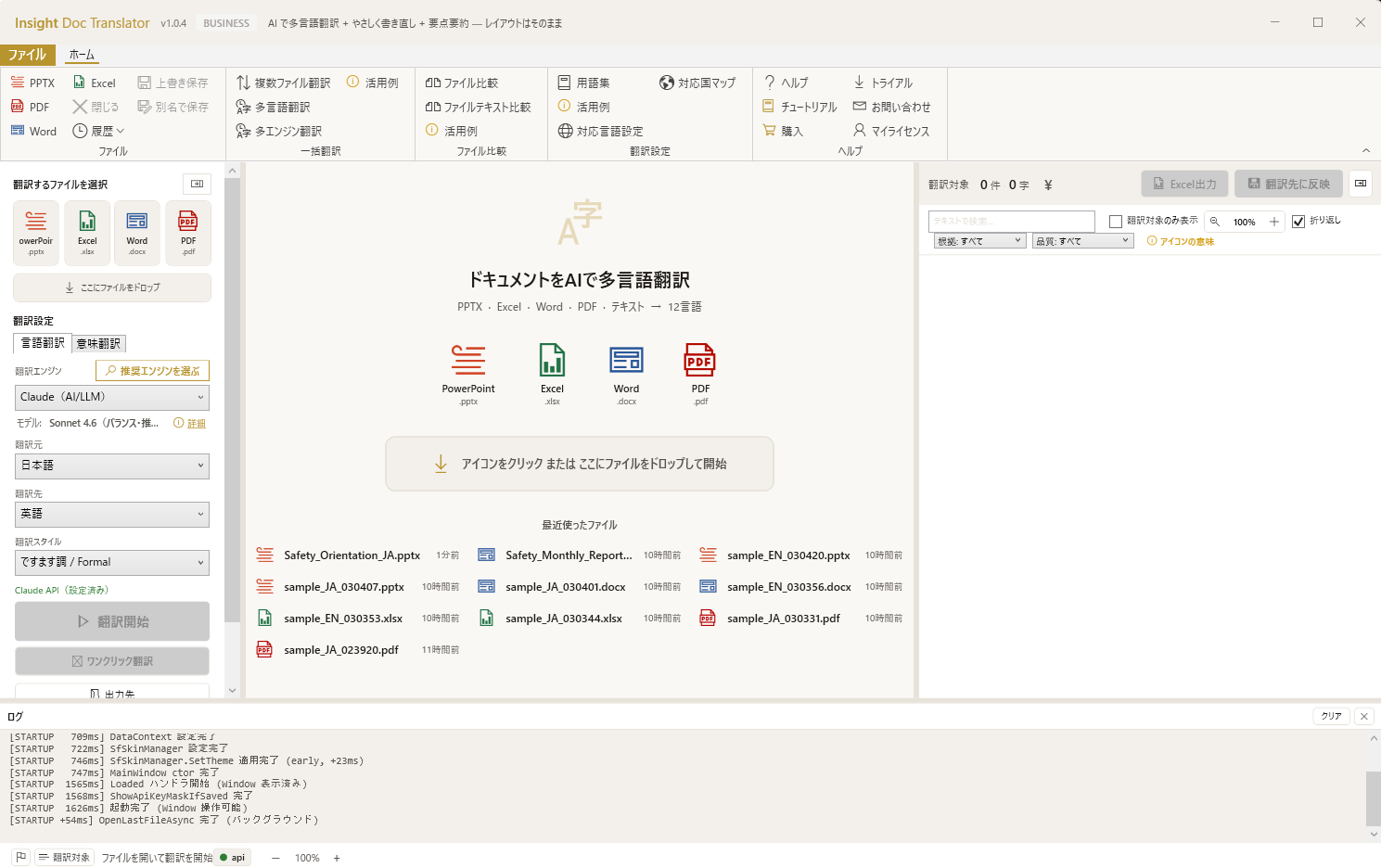
Insight Doc Translator
AI Translation + Easy Rewrite + Summarize — Layout…
- Triple-axis translation — Interlingual (47 langs × 6 engines) + Intralingual (Easy/Shorten/Polite rewrite) + Furigana for Japanese
- Multi-format support — PowerPoint (.pptx), PDF, Word (.docx), Excel (.xlsx), Text (.txt)
- 47 languages — including Japanese, English, Chinese, Korean, Vietnamese, Thai, Indonesian, Tagalog, Burmese, Nepali, and 37 more
Insight Office
Open, analyze, compare. Word, Excel, PowerPoint, a…
- Unified workspace — open Word, Excel, PowerPoint, and PDF in a single app
- Multi-provider AI — Claude, OpenAI, Gemini via BYOK (Bring Your Own Key)
- One-click AI analysis — summarize, proofread, translate, extract data insights
Your existing documents become training videos
Manuals, SOPs, and Excel data — AI structures them into PowerPoint, then converts to training videos. No new content creation needed.
Expected Benefits
Document Review
Significant
Reduction — AI checks slides for text, formatting, and consistency issues. Reduces manual review effort
Report Creation
Streamlined
Attach past documents as references — AI drafts new documents using your existing knowledge
Training Video Production
In-House
Generate narrated videos from PowerPoint internally. Reduce outsourcing costs and production time
These are expected benefits based on product capabilities. Actual results vary by project scope, workflow, and organizational readiness.
From Download to Deployment
Start small, prove the value, then scale. No IT department needed for Phase 1.
Download & Try
Download the free version. Open your existing files — everything works immediately. No setup, no migration.
Small Team Pilot
3–5 people try it on real projects. Measure time saved on reviews, reporting, and video creation.
Department Rollout
Upgrade to business licenses. Shared server collaboration. Volume pricing available.
Company-Wide Platform
Full Insight Business Suite deployment with partner support, training, and customization.
Implementation & Support Structure
Insight Business Suite is a self-developed product backed by certified partner-led deployment support. From requirements analysis and environment setup through user training and operational adoption, a dedicated team walks alongside you. Ongoing improvement proposals, update rollouts, and technical support ensure stable operations regardless of organization size.
Enterprise Support
Dedicated Partner Network
Certified partners provide implementation consulting, training, and ongoing support.
On-Premise / Air-Gapped
All tools run locally on each PC. No data leaves your network. No cloud dependency.
Customization for Your Processes
Using tools out of the box is just the start. Customizing them to fit your company's culture and workflows drives significantly greater results. Contact us to discuss customization.
Simple, Transparent Pricing
Start free. No credit card. No time limit.
Free
¥0
Forever — core features included
- All core features
- No time limit
- No credit card
- BYOK AI support
BIZ
¥20,000/year (Personal) or ¥50,000/seat/year (Business). Auto-detected by email.
- Save & export enabled
- All AI features (BYOK)
- Product updates
- 1 device · 365 days
Enterprise
Multi-product or multi-device deployments — custom quote.
- Custom quote
- Volume terms
- Direct contact
All prices exclude tax. BYOK (Bring Your Own Key) supported — use your own Anthropic API key.
GET STARTED
Bring training videos and document translation in-house with a desktop app.
Drop a PowerPoint to generate narrated training video. Translate Word / Excel / PPTX / PDF into 47 languages with layout intact. Local processing, BYOK, no MS Office required.
Insight Doc Translator
47 languages × 6 AI engines + simplify/summarize/polish. PowerPoint/PDF/Word/Excel — layout preserved.
Solo / individual → Personal · Teams & organizations → Business
Insight Training Studio
Generate narrated training video from PowerPoint or PDF. 47 languages, 3 TTS engines, SCORM 1.2 export.
Solo / individual → Personal · Teams & organizations → Business
LemonSqueezy auto-converts to your local currency at checkout. Try the free trial before you buy.
Frequently Asked Questions
Common questions from IT managers and department heads evaluating our tools.
Local AI vs. Cloud-Only Solutions
Same .xlsx / .docx / .pptx files. AI works on your PC — no cloud upload, no data centralization required.
| Feature | Insight Business Suite | Microsoft 365 | Google Workspace | Cloud RAG Tools |
|---|---|---|---|---|
| AI creates & reviews documents | Edits files directly | Copilot ($30/mo extra) | Gemini (limited) | Text only |
| AI writes changes back into files | Yes — formulas, slides, narration | Chat suggestions only | Chat suggestions only | No |
| AI data validation & auto-transfer | Reads content and matches automatically | Not available | Not available | Not available |
| Version control for Excel | Built-in | SharePoint only | No (.xlsx) | No |
| PPTX diff & merge | Text-element level | Not available | Not available | Not available |
| Personal document RAG | Drag & drop | Not available | Not available | Yes (cloud) |
| Training video from PPT | AI narration + multilingual | Not available | Not available | Not available |
| AI image generation | Built-in | Not available | Not available | Not available |
| MS Office required | Not required | Required | N/A (web only) | Varies |
| Works offline / air-gapped | Yes (local) | Partial | No | No (cloud required) |
| Data stays on-premise | Yes (AI queries use API) | Cloud | Cloud | Cloud |
| Unified Office + AI (Word/Excel/PPT) | Insight Office — one app | Separate apps | Web only | Not available |
| Cross-format AI analysis | Yes — reads all formats together | Not available | Not available | Text only |
| Monthly subscription | No (annual) | $12.50–22/mo | $7–18/mo | $20–50+/mo |
Comparison based on publicly available product information as of March 2026. Cloud RAG tools column represents typical offerings (e.g., Notion AI, Dify, ChatGPT Teams).
AI That Actually Edits Your Files — Securely
Not "ask AI" — "let AI do it." AI directly reads and rewrites your files, with anonymization and send-preview keeping your data safe.
Find and Fix Formula Errors Automatically
AI scans every formula in your workbook, catches calculation errors and broken references, and writes fixes back into cells. It also surfaces anomalies like sudden spikes versus the prior period or values that don't reconcile to last year — before anyone else notices.
Copy Data Between Excel Files Automatically
Drag an existing Excel file onto a collection template. AI reads both files, figures out which columns match which fields, and fills in the values automatically. It only asks for human confirmation where it's unsure. No more manual copy-paste.
Create New Documents from Past Reports
Drag and drop past reports and specs as references. AI learns your writing patterns and drafts new documents. You can also bulk-generate documents from an Excel data list and a template in one go.
AI Reviews and Fixes All Your Slides at Once
Typos, inconsistent wording, structural issues — AI checks every slide and writes corrections directly into your deck without breaking the layout. 30+ built-in check types included, and AI automatically adjusts its processing depth based on the task.
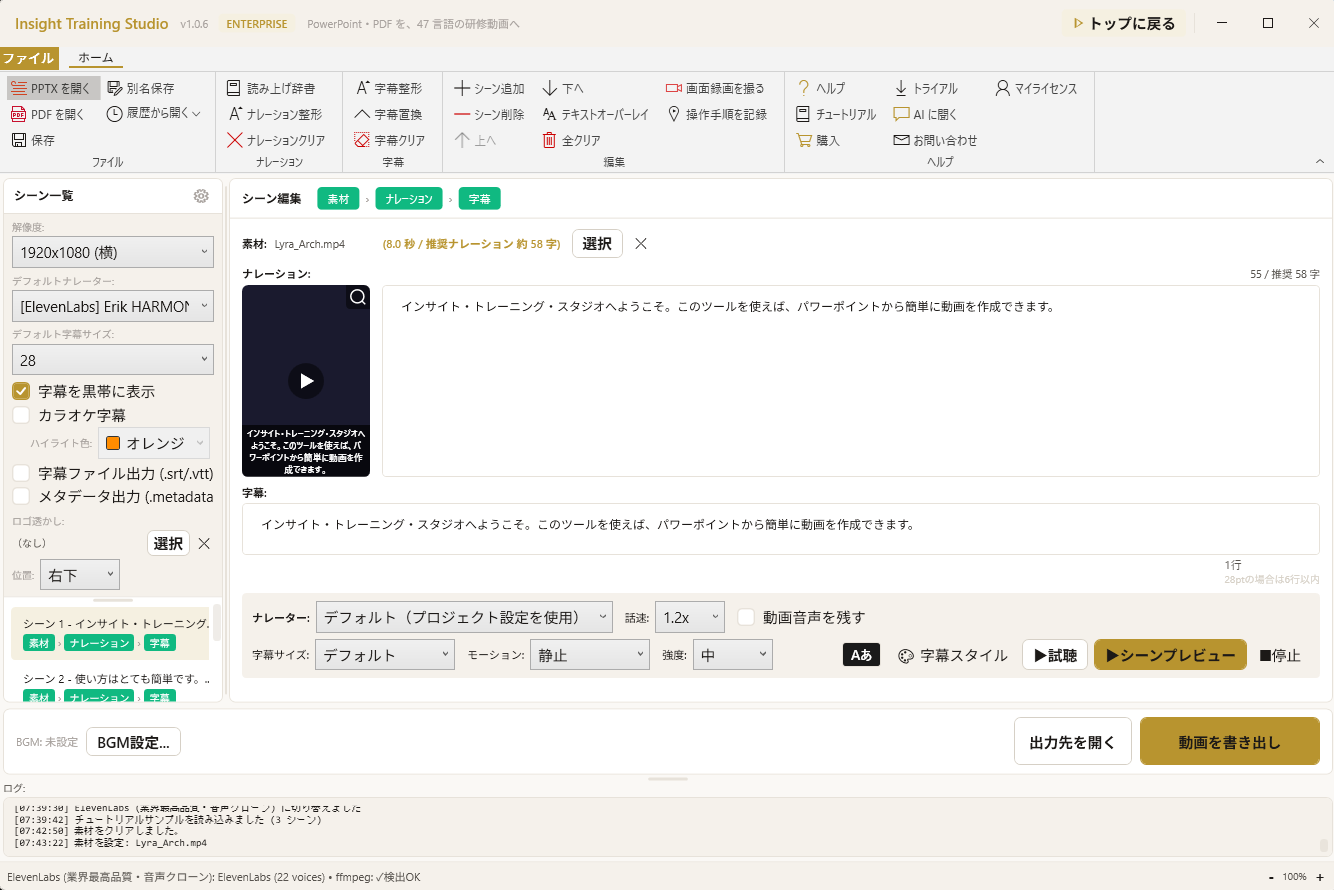
Turn PowerPoint into Training Videos (Multilingual)
Speaker notes become narration with 30+ AI voices to choose from. Generate subtitles with one click, and instantly translate to English, Chinese, or Korean. AI even rewrites bullet-point notes into natural spoken narration scripts.
AI Generates Images and Thumbnails for Your Videos
AI creates scene images and thumbnails right inside your video project. Pick from 11 layout patterns, and AI generates multiple variations for A/B testing. Professional-looking visuals without any design tools.
One App, All Formats — AI Reads Across Everything
Open Word, Excel, and PowerPoint in one window. AI reads your Excel data and drafts a Word report. Review PowerPoint against spec documents. Cross-format intelligence without switching apps — this is Insight Office.
AI You Can Trust in the Workplace
Built from years of consulting practice. AI that operates on the files you already work with — with security designed in from day one.

47 langs
Including 9 specified-skill workforce languages
BYOK
Vendor billing flows direct, no markup
Local
Documents processed on your PC

AI you can trust — try it with your own files
Open your .xlsx or .pptx in the free version. See AI edit your documents — with anonymization protecting your data. Then scale with confidence.
The era of 'can AI do it?' is over. The question now is 'can we use AI safely?' Insight Series answers yes — with proof built into every product.
Free version available — no credit card, no commitment