Coming Soon
This product is currently being prepared for release. Download and purchase are not yet available. Please contact us to be notified when it launches.
Request launch notification→Insight Compare
Insight Compare
Compare versions of drawings and spreadsheets. Reconcile two tables by their IDs.
Insight Compare is a Windows application that compares versions of PDFs (drawings and documents) and spreadsheets, and reconciles two tables that were built separately. It lists what changed between an earlier and a later version — changed cells, added and removed rows, changed dimension and note text on drawings — and which rows disagree between two independently kept tables. Results can be reviewed on screen, exported as a spreadsheet, or written as a PDF with the changed places framed in red. Comparison and reconciliation are computed by fixed rules; no AI is involved, and the contents of your files are not sent to an external server for comparison.
Development Background
Born from the question: "Why doesn't Office have this feature?"
On a builder's design desk, the questions an outsourcer wrote onto the first drawing had to be checked, one by one, against the revised drawing. In finance, two registers kept by different departments were reconciled by eye. We did not want a tool that 'judges' with AI — we wanted one that lists, by a fixed procedure, exactly where two versions differ and which rows do not agree, so people can make the call with the originals in hand. That is Insight Compare.
HOW TO
How it works, on video (2–3 min each)
All data shown is fictional. Japanese narration with subtitles.
1. Spreadsheet versions & table reconciliation (2:55)
2. PDF drawings (shapes & marked-up PDF) (2:19)
Drawings — text, shapes, and red-lining
For CAD-exported PDFs, changed dimension and note text plus changed lines and hatching are found. Scanned or image-only drawings cannot have their text compared, but the places where red-lining or images differ are framed.
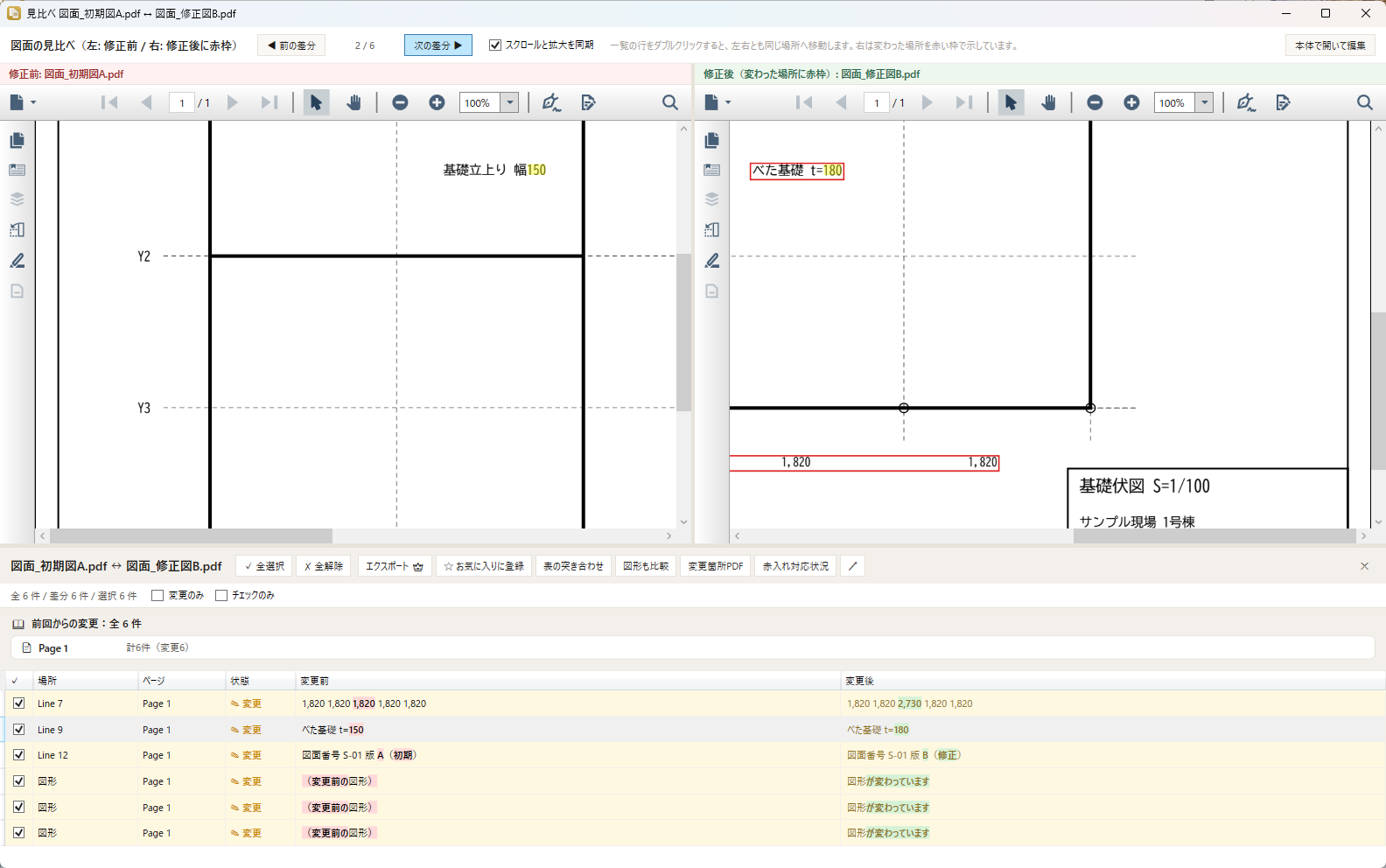
Side by side (left: before / right: changes framed)
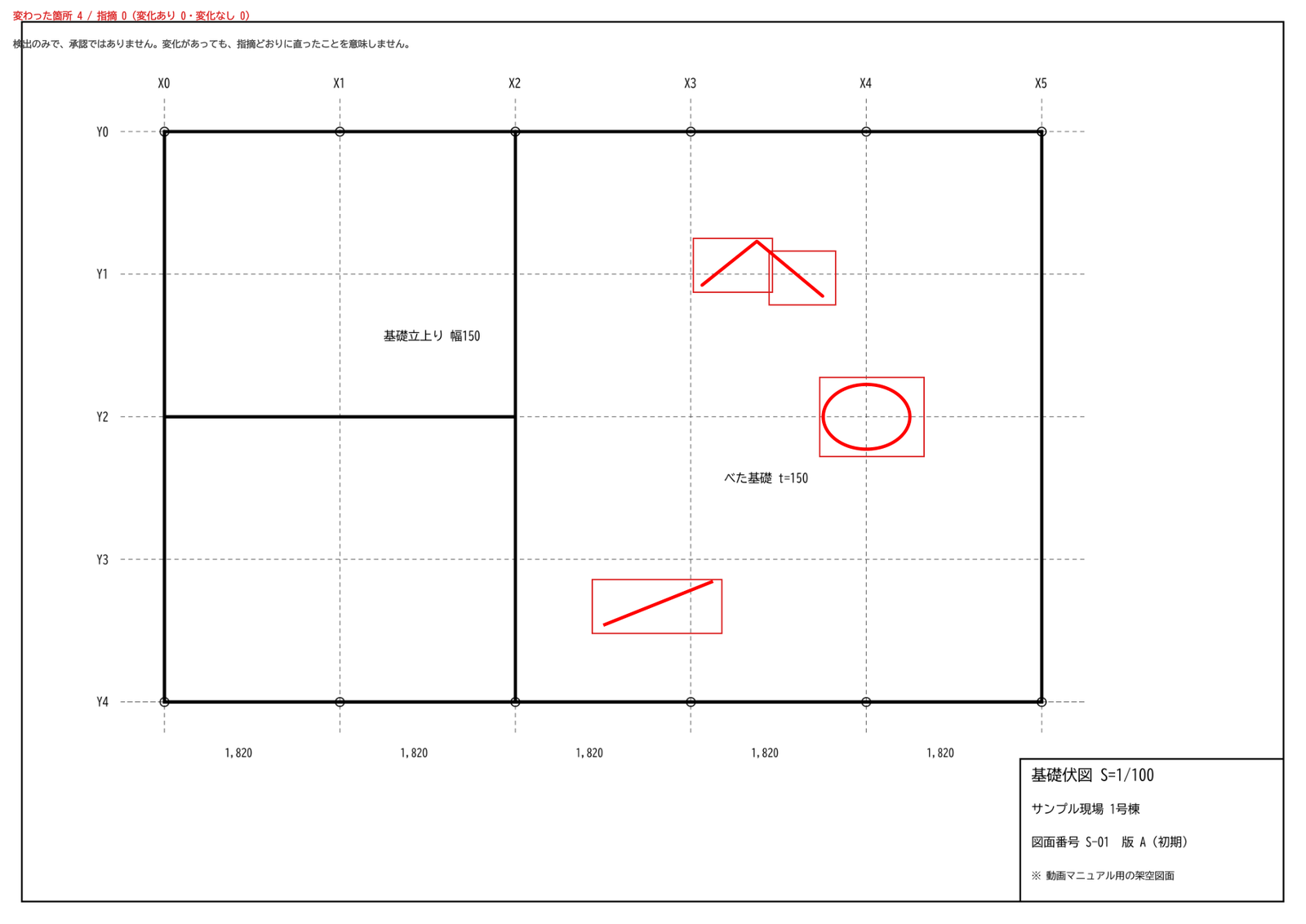
Image-only drawing: red-lining framed
Please note
False positives, misses, and mismatches can occur. "No difference" does not guarantee the files are identical, and "change detected" does not mean a correction was completed. Do not base construction, ordering, payment, or approval decisions on this result alone — confirm with the originals and your usual procedures.
How it works
Version compare, table reconciliation, marked-up PDF — three screens tell the story. All data shown is fictional sample data.
Compare versions
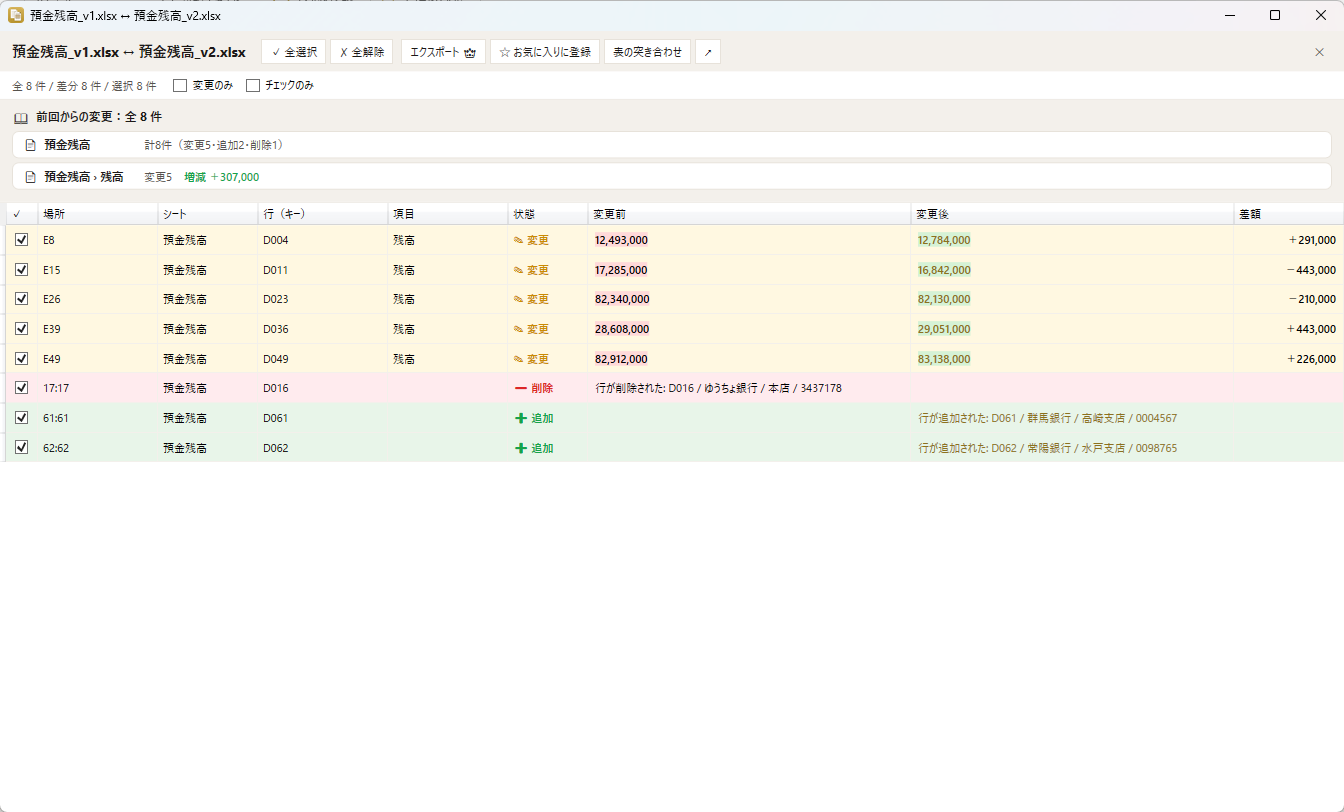
Pick the earlier and the later version of the same document and only the changes are listed: the row key, the column header, the old and new values, and the delta. Rows that merely moved are not counted.
Reconcile tables
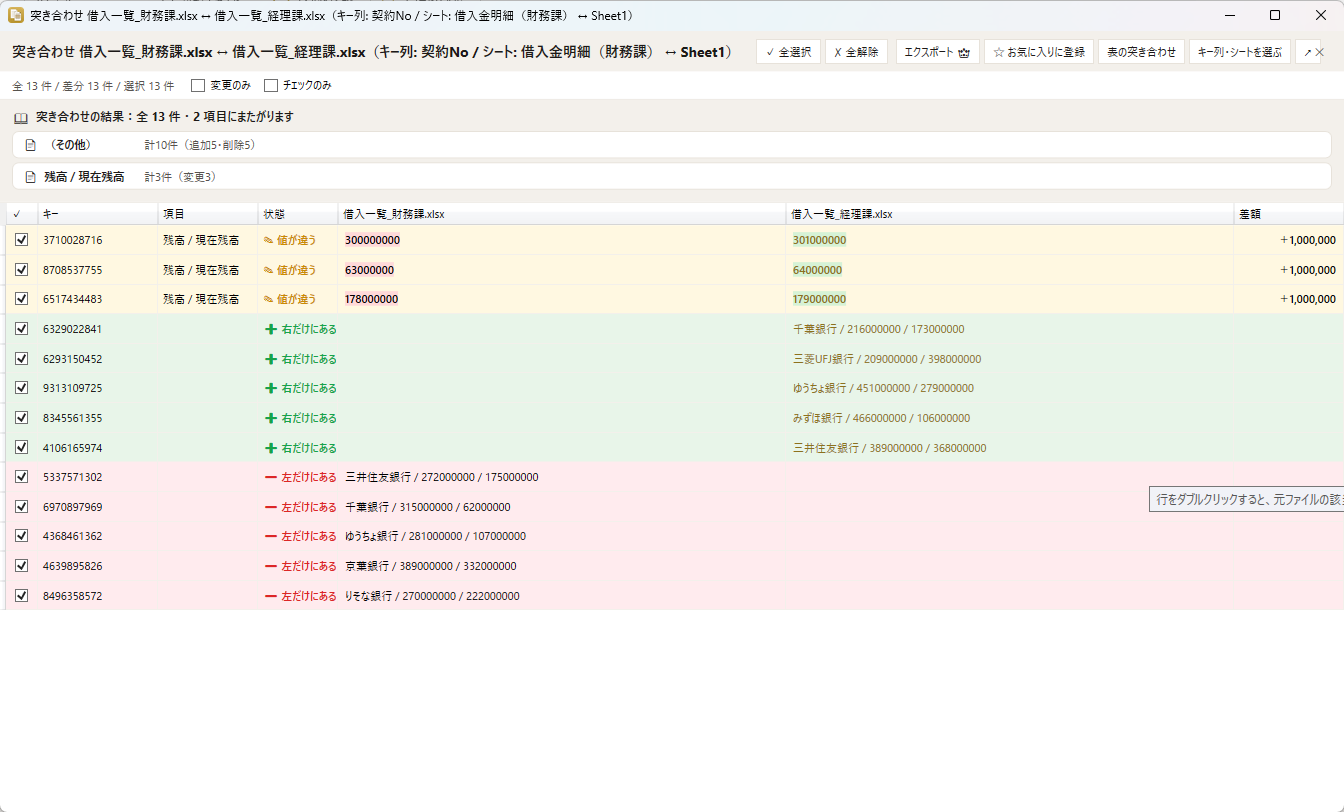
Match two tables kept by different people by a key such as a contract number: matched count, rows on one side only, and differing values. Columns with different headers but the same contents are paired automatically.
Marked-up PDF
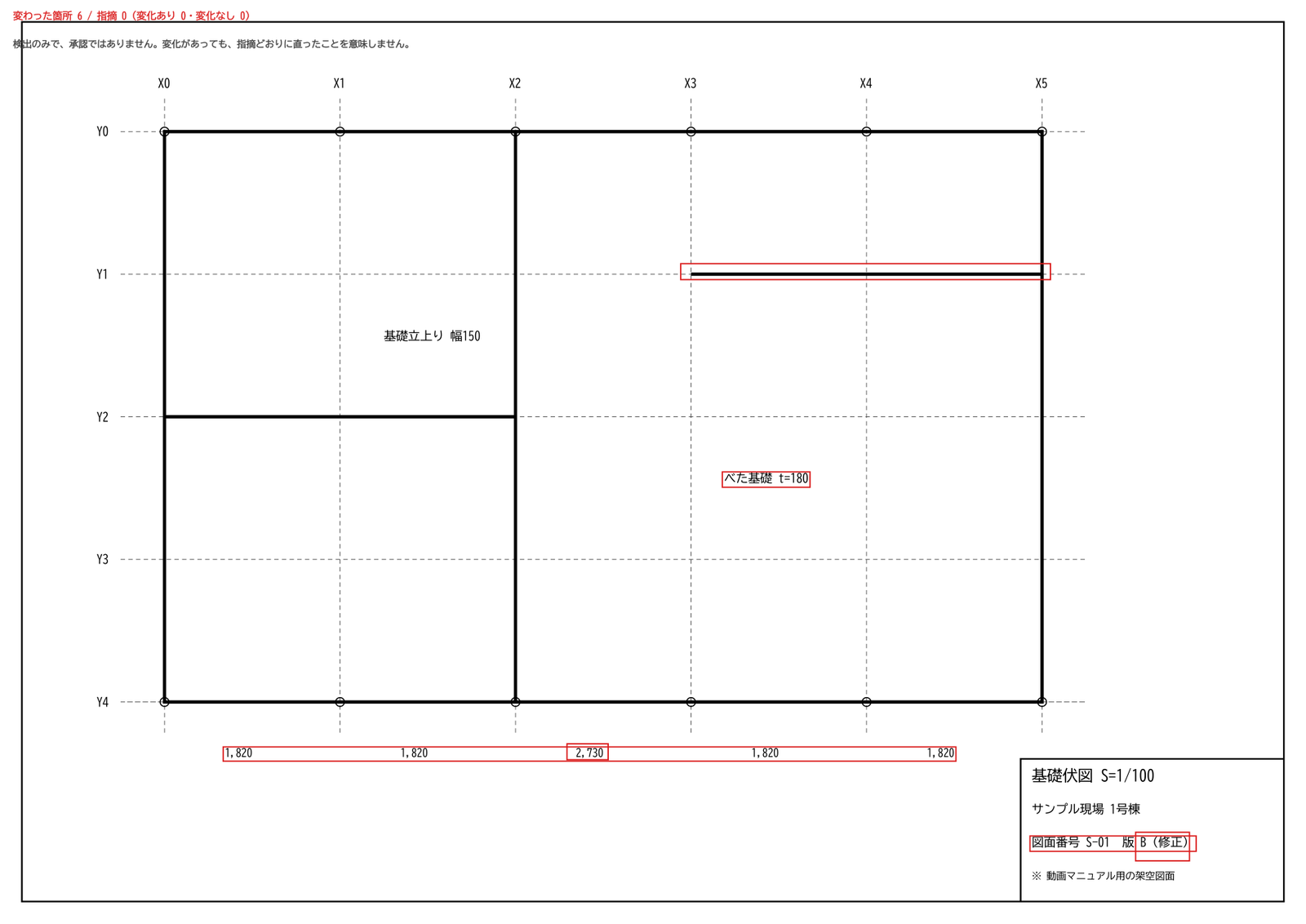
Compare the first and the revised drawing, pick up changed lines and hatching with shape compare, and write a PDF with the changed places framed in red on the newer version — ready to circulate.
Key Features
Show all features (10)Collapse
File Compatibility & Limitations
Supported
- PDF with extractable text (CAD output, documents) — version compare, shape compare, marked-up PDF, markup review
- Excel (.xlsx / .xlsm / .xls) and CSV — version compare and table reconciliation
- Word (.docx) and PowerPoint (.pptx) — text comparison
- Windows 10 / 11 (64-bit). Runs on the desktop; no account required to compare
Notes & Limitations
- Image-only PDFs (scans) — text cannot be compared; shape compare can still show where things look different
- .xlsb and CAD files (DWG etc.) are not supported
- On drawings displayed rotated, the frames for text differences are approximate; shape changes and annotations are positioned exactly
- Reconciliation is one-to-one by key; one invoice against several payments is not matched
- "No difference" does not guarantee the files are identical, and "change detected" does not mean a correction was completed — confirm with the originals
Real-World Use Cases
Implementation & Support Structure
Insight Business Suite is a self-developed product backed by certified partner-led deployment support. From requirements analysis and environment setup through user training and operational adoption, a dedicated team walks alongside you. Ongoing improvement proposals, update rollouts, and technical support ensure stable operations regardless of organization size.
AI you can trust — try it with your own files
Open your .xlsx or .pptx in the free version. See AI edit your documents — with anonymization protecting your data. Then scale with confidence.
Free version available — no credit card, no commitment