Coming Soon
This product is being prepared for release. You can download the free trial now (purchase will open at launch). Contact us to be notified when it launches.
Request launch notification→Insight Milestone
Insight Milestone
Team schedules on one timeline — and members who keep it up to date.
Insight Milestone is a Windows application for managing team schedules as a milestone table: each row (a project, a building, a task) holds several milestones, and the timeline shows who is late and what moves when a date changes. Each member sees only their own items on Home and updates them in one click — done, new date, or "at risk" with a short reason that reaches the manager as an issue. Managers see their team and organization by tabs (needs action, issues, people, dates, projects) and run progress meetings with per-person reports and minutes. Schedules are plain files in a shared folder (SharePoint, OneDrive, Box, Google Drive or a file server), so no server is required, and two people saving at the same time do not overwrite each other.
Development Background
Born from the question: "Why doesn't Office have this feature?"
Schedules kept in spreadsheets stop being updated: the person on site is busy, the file is somewhere on the share, and the manager finds out about a delay at the meeting. We built Insight Milestone so that updating takes a single click from the screen each member already looks at every morning, and so that managers can see who is behind — and who has stopped updating — without asking.
COMPARISON
How it differs from other tools
Insight Milestone focuses on keeping schedules up to date. Other tools are better at mobile use and detailed effort tracking.
| Item | Insight Milestone | Excel | Microsoft Project | Asana | Backlog | Jira |
|---|---|---|---|---|---|---|
| Several milestones on one row (Japanese-style line schedule) | ◎ | ○ | △ | △ | △ | △ |
| Moving a date shifts the dates that follow | ◎ | △ | ◎ | ○ | △ | △ |
| Reasons and counts of changes, and the diff since the last meeting | ◎ | △ | ○ | △ | ○ | ○ |
| Members update their work in one click | ◎ | △ | △ | ◎ | ○ | ○ |
| Issue tracking and progress meetings | ○ | △ | △ | ○ | ◎ | ◎ |
| Import Excel schedules and export them in the same layout | ◎ | — | ○ | △ | △ | △ |
| Start right away without setup | ◎ | ◎ | △ | ○ | ○ | △ |
| Runs entirely in-house (no cloud required) | ◎ | ◎ | ○ | — | △ | △ |
| Use from a phone or browser | △ | ○ | △ | ◎ | ◎ | ◎ |
| Detailed effort, cost and resource management | △ | ○ | ◎ | ○ | △ | ○ |
◎ Strong ○ Supported △ With setup, workarounds or higher plans — Not supported
Our assessment based on public information as of October 2026. Results vary by version, plan and configuration. Product names are trademarks or registered trademarks of their respective owners.
HOW TO
How it works, on video (1–2 min each)
All data shown is fictional. Japanese narration with subtitles.
Scheduling in the AI era (2:06)
Getting started: the Start screen (1:17)
Create a schedule from documents (AI) (1:28)
Update progress from weekly reports (AI) (0:55)
How it works
Members update, the timeline shows the whole picture, the meeting confirms it — three screens tell the story. All data shown is fictional sample data.
Update today
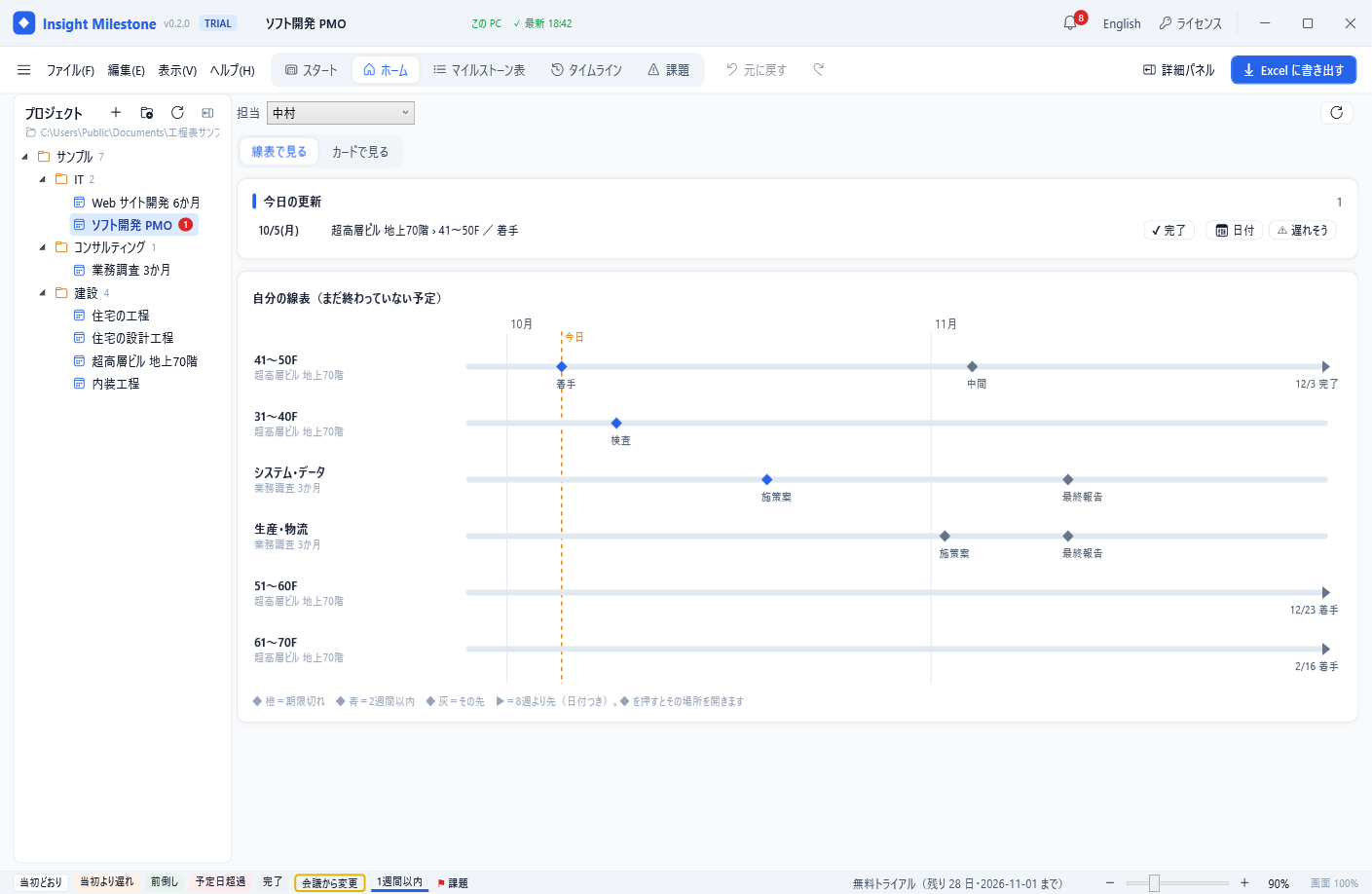
Each member sees only their own items on Home: Done when finished, Date when it moves, and At risk with a short reason — which reaches the manager as an issue.
See the timeline
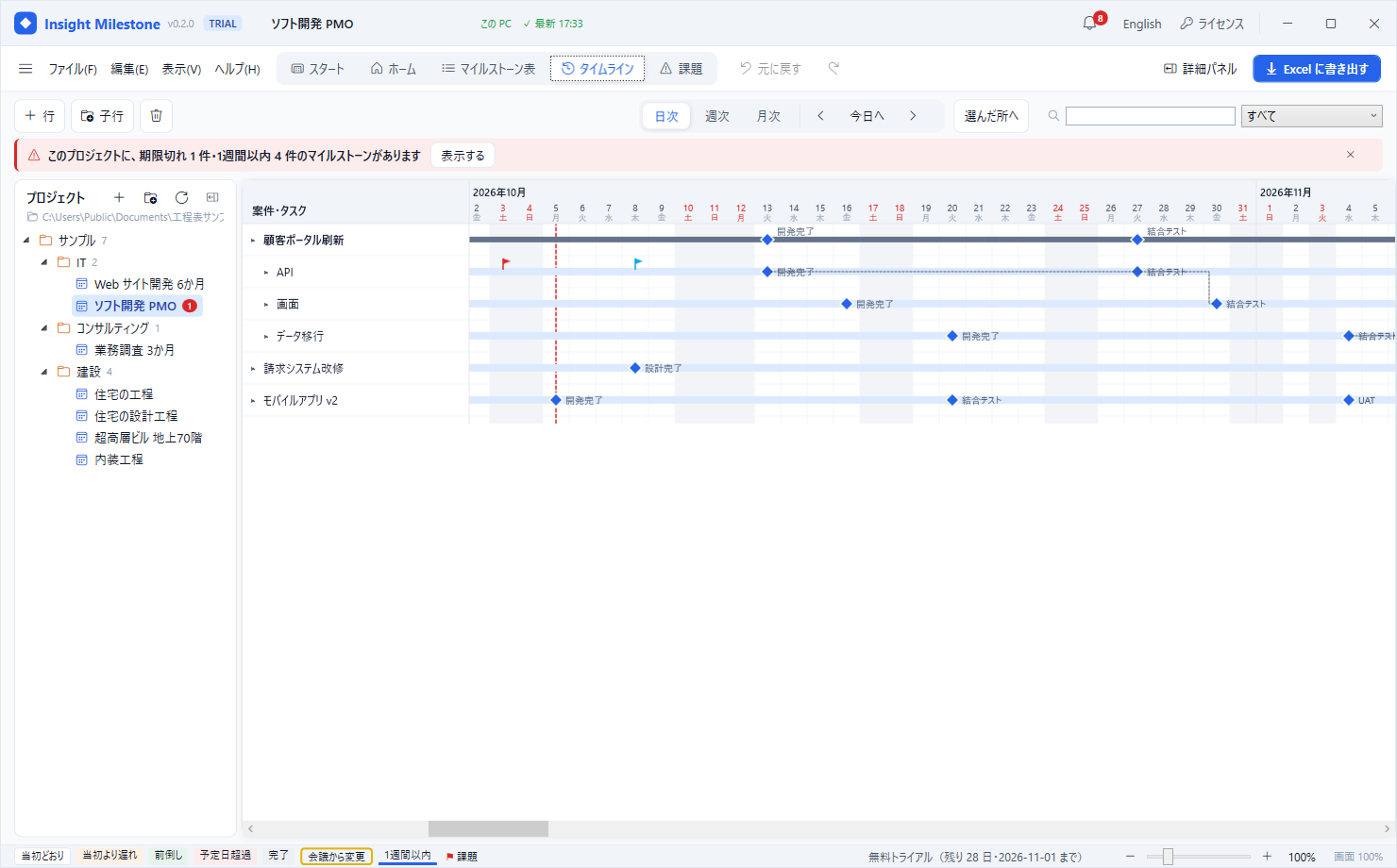
Several milestones per row. Switch between day, week and month; drag a date and the following ones shift by working days. Draw links between rows.
Issue meeting
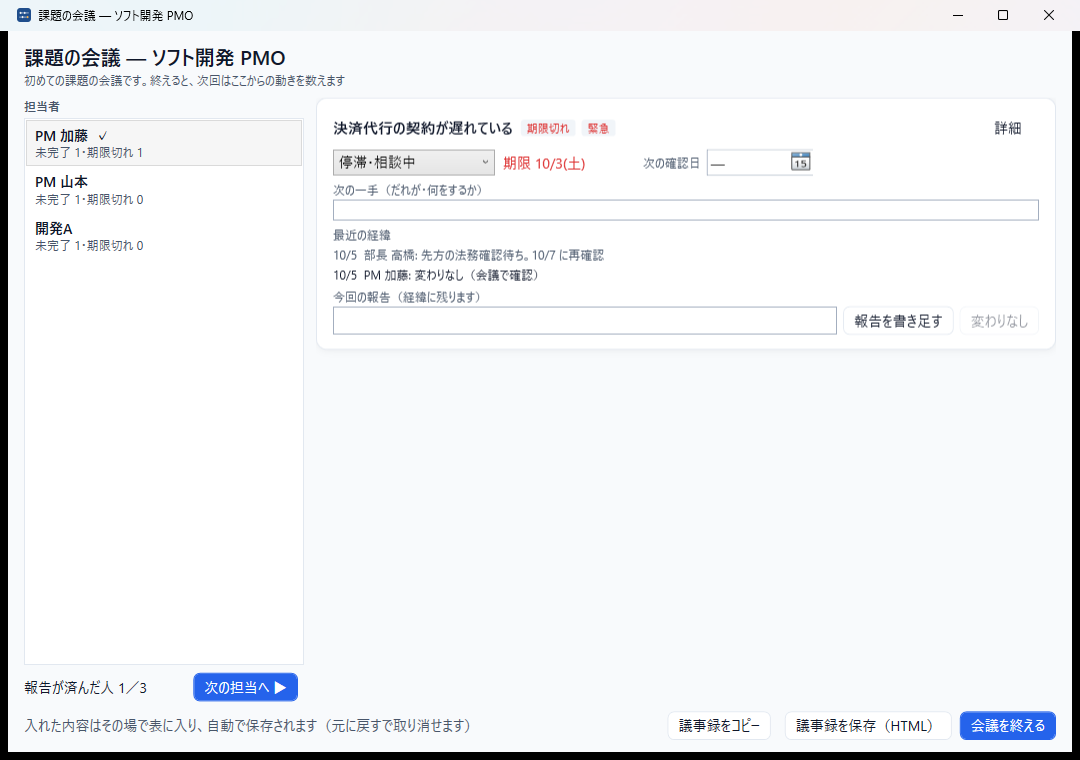
In the progress meeting, go through each person, update status, next action and follow-up as they report, record "no change", and copy the minutes at the end.
Key Features
Show all features (10)Collapse
File Compatibility & Limitations
Supported
- Windows 10 / 11 (64-bit)
- Shared folders: SharePoint / OneDrive, Box, Google Drive, Dropbox, file servers
- Excel (.xlsx) import and export; CSV
- Japanese and English user interface
Notes & Limitations
- Windows only (a web version is under consideration)
- Access control follows the shared folder's permissions; views by team or organization are filters, not permissions
- Real-time co-editing over a server is not included in the standard plans
Real-World Use Cases
Implementation & Support Structure
Insight Business Suite is a self-developed product backed by certified partner-led deployment support. From requirements analysis and environment setup through user training and operational adoption, a dedicated team walks alongside you. Ongoing improvement proposals, update rollouts, and technical support ensure stable operations regardless of organization size.
Try Insight Milestone
Download the free trial and try it with the sample schedules. Purchase will open at launch.
Windows 10 / 11 (64-bit)