What is SCORM 1.2?
The de-facto standard for corporate LMS
What corporate buyers, HR, and IT teams need to know — on one page. Why it matters, how 1.2 / 2004 / xAPI differ, INMV's export flow, supported LMSes, and a full FAQ.
Last updated: May 2026
Section 1
Three quick questions, answered
Q1. What is SCORM?
An industry-standard format that connects an LMS (Learning Management System) with training content (videos, slides, etc.). When you export a training video as a SCORM package (a ZIP file), any SCORM-compliant LMS can ingest it directly and automatically track completion status, view time, and resume position per learner.
Q2. Why does it matter?
Because the proof of completion is recorded automatically. Regulated training (safety, harassment, Japan's new specified-skill workforce program 2027) requires audit-ready proof that the training was actually completed. Just hosting an MP4 on a network share means you'd have to track 'who watched it through to the end, and when' by hand. A SCORM package lets the LMS do this automatically and produce audit reports on demand.
Q3. SCORM 1.2 vs 2004 vs xAPI — which one?
Start with SCORM 1.2 — it covers the vast majority of cases. A 2001-era standard, but 80%+ of Japanese LMSes and most major international LMSes still treat it as the primary supported format because it's simple and reliable. SCORM 2004 / xAPI are only needed for advanced requirements like branching pedagogy or learning data lake integration. INMV exports SCORM 1.2 packages.
Section 2
Why is SCORM 1.2 still the standard in 2026?
Pre-empting the natural question: "isn't there something newer?"
2001
The U.S. Department of Defense's ADL (Advanced Distributed Learning) initiative published SCORM 1.2. The first widely-adopted industry standard for e-learning content / LMS interoperability.
2004
SCORM 2004 added advanced features like sequencing (branching pedagogy) and multi-objectives tracking. But the implementation complexity meant many LMSes kept 1.2 support as the primary path.
2013 →
xAPI (Tin Can) / cmi5 arrived, enabling tracking of learning activities beyond the LMS (mobile apps, VR, IoT, etc.). Adoption has been limited though, and SCORM 1.2 remains the mainstream.
2026 (now)
Every major LMS in active use — Moodle, Cornerstone, SAP SuccessFactors, TalentLMS — still treats SCORM 1.2 as a primary supported format. Its simplicity and unparalleled cross-LMS compatibility mean new deployments still pick it as the de-facto standard.
※ Put simply: SCORM 1.2 is the HTTP/1.1 of the e-learning world. Newer standards exist, but simplicity and compatibility keep it dominant.
Section 3
SCORM 1.2 / 2004 / xAPI compared
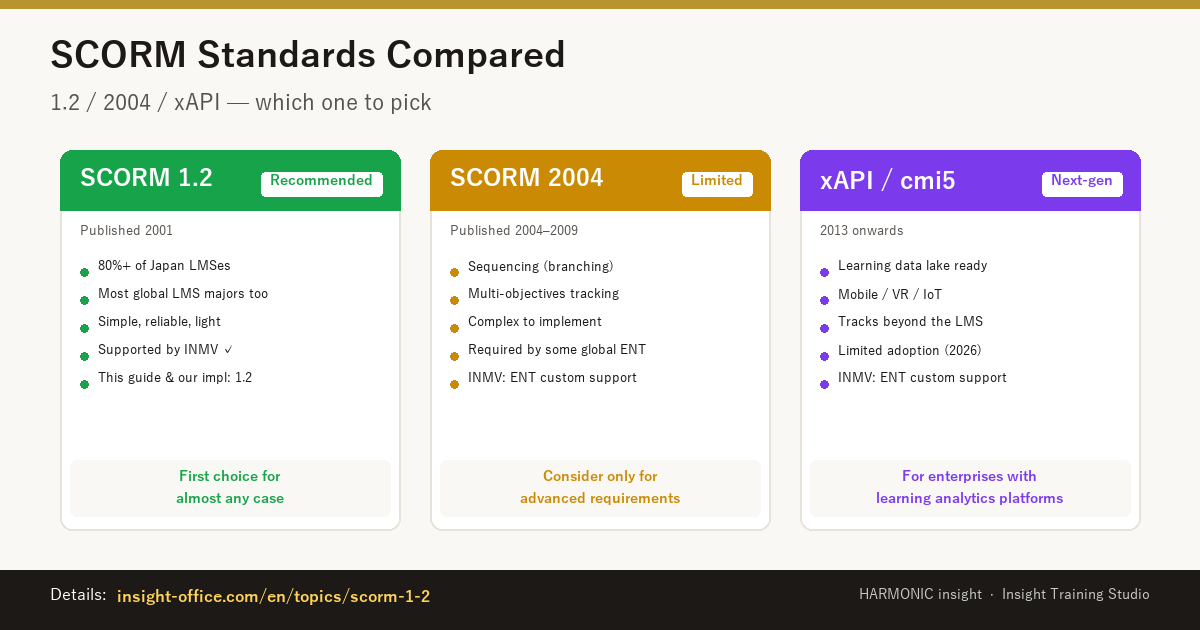
※ Free to repost on social media or articles. URL: insight-office.com/topics/scorm-1-2/scorm-comparison-1200x630.png
| Standard | Published | Coverage | Features | Recommendation |
|---|---|---|---|---|
| SCORM 1.2 | 2001 | 80%+ of Japan LMSes / most global majors | Simple, reliable, light implementation | ✅ Supported by INMV — first choice in almost all cases |
| SCORM 2004 (4th ed.) | 2009 | Required by some global majors for advanced features | Sequencing (branching), multi-objectives tracking | ⚠️ Limited cases · ENT custom support |
| xAPI (Tin Can) / cmi5 | 2013 → | Next-gen (learning data lake integration) | Tracking beyond the LMS (mobile, VR included) | ⚠️ For enterprises with learning analytics platforms · ENT custom support |
Section 4
The 3 values INMV records in SCORM
SCORM 1.2 supports dozens of CMI elements, but for training-video use cases only 3 of them actually matter. INMV records exactly these three.
Value: completed / incomplete
Did the learner watch to the end? The single most important evidence for HR audits, specified-skill workforce reporting, and compliance training records. INMV sends 'completed' the moment playback reaches the end of the video.
Value: session / cumulative
How many minutes were actually watched. Detects fast-forwarding and casual browsing, useful for training effectiveness measurement. Aggregatable by department or learner in your LMS's reporting.
Value: 0 to video length, in seconds
Learners who paused mid-way can resume from where they left off. INMV writes this on a 5-second throttle to avoid excessive API calls.
Bonus: lesson_mode = review protection
When the LMS reports review mode (re-watching, reference-only), INMV does not overwrite completion. Prevents the failure mode where a learner's prior completion gets wiped by a re-view.
Intentionally NOT implemented
- cmi.interactions.* / cmi.objectives.* (quiz / choice tracking) — INMV doesn't have a quiz feature
- Score / pass-fail (cmi.core.score.* and adlcp:masteryscore) — same reason
- Threshold rules like "80% watched = completed" — use your LMS's built-in features for this
Section 5
Representative supported LMSes
Major SCORM 1.2-compliant LMSes. INMV's exported SCORM packages should ingest and run on these.
Moodle
✓ VerifiedOSS (largest global market share)
Verified working with INMV
Cornerstone OnDemand
Global enterprise
Expected to work (SCORM 1.2 compliant)
SAP SuccessFactors
Global enterprise
Expected to work (SCORM 1.2 compliant)
TalentLMS
Mid-market (cloud)
Expected to work (SCORM 1.2 compliant)
iSpring Learn
Mid-market (cloud)
Expected to work (SCORM 1.2 compliant)
Docebo
Global mid-market / enterprise
Expected to work (SCORM 1.2 compliant)
AirCourse / KIBOW / WisdomBase
Japan-domestic cloud
Expected to work (SCORM 1.2 compliant)
SCORM Cloud (Rustici)
✓ VerifiedIndustry reference tester
INMV package registered and verified (2026-05-11)
Our verification stance: INMV has been registered and verified with Moodle (the industry reference LMS) and SCORM Cloud (Rustici's test service) as of 2026-05-11. Other SCORM 1.2-compliant LMSes should work in principle but are not individually verified. If you want to confirm it on your specific LMS, joint verification is available( Email info@h-insight.jp )。
Section 6
INMV's SCORM 1.2 export flow
One extra step in your existing video workflow. The only new control is a SCORM checkbox in the export dialog.
- 1
Drop PowerPoint / PDF / screen recordings into INMV
Build your training video as usual — slide text generates narration automatically, screen recordings turn into AI-narrated tutorials. Your existing workflow stays intact.
- 2
Tick "SCORM 1.2 Package" in the export dialog
Alongside the regular MP4 output, INMV will also produce a SCORM 1.2 package. MP4 still exports in parallel, so non-LMS workflows are unchanged.
- 3
Saved as a ZIP file
A ZIP containing imsmanifest.xml + an HTML5 wrapper + the video itself. One video = one SCORM package. For multilingual versions, recommend exporting per language as separate packages.
- 4
Upload as SCORM content from your LMS admin panel
In Moodle: Course → Add activity → SCORM package. In Cornerstone: Course Catalog → SCORM Content. Each LMS has its own ingest flow.
- 5
Learner watches → completion / time / bookmark recorded automatically
Once a learner starts the video, the LMS automatically records completion, view time, and the resume bookmark. Mid-way pauses can resume; re-views don't overwrite prior completion records.
Section 6.5
60-second explainer video + materials you can actually try
This explainer video itself was produced in-house with Insight Training Studio (PPTX → MP4, generated inside the same desktop app).
The ZIP package can be uploaded to your own LMS for live verification.
📩 Get notified when this guide is updated
We'll send notifications when EN / ZH versions and related materials are published. Opt-out anytime.
SCORM 1.2 sample ZIP
~13 MB
Upload to your own LMS to confirm it works. Verified on Moodle + SCORM Cloud.
MP4 video
~14 MB · 1080p · ~3 min
Standalone video. Use for internal training, sales decks, or YouTube uploads.
Source PPTX
8 slides + speaker notes
The source for this explainer video. Use as a template for editing / multilingual versions / further INMV runs.
Internal proposal PPTX (JP)
14 slides · IT/HR-to-exec proposal template
ROI calculation (¥15M outsourcing → ¥50K/year), specified-skill workforce 2027, SCORM audit compliance, 3-phase rollout plan, decision items.
※ Sample ZIP is a minimal SCORM 1.2-compliant implementation (records lesson_status / session_time / lesson_location with review-mode protection). Contains imsmanifest.xml + HTML5 wrapper + the video itself.
※ The internal proposal PPTX is free to modify and use internally. Customize the placeholders (department, budget, current vendor) for your specific context.
Section 6.6
Verified by SCORM Cloud (industry reference tester)
SCORM 1.2 packages exported from Insight Training Studio have passed verification on SCORM Cloud (Rustici Software) — the industry's reference compliance tester. The screenshot below shows actual verification output: Completion status and Total Time are correctly recorded on Rustici's servers.
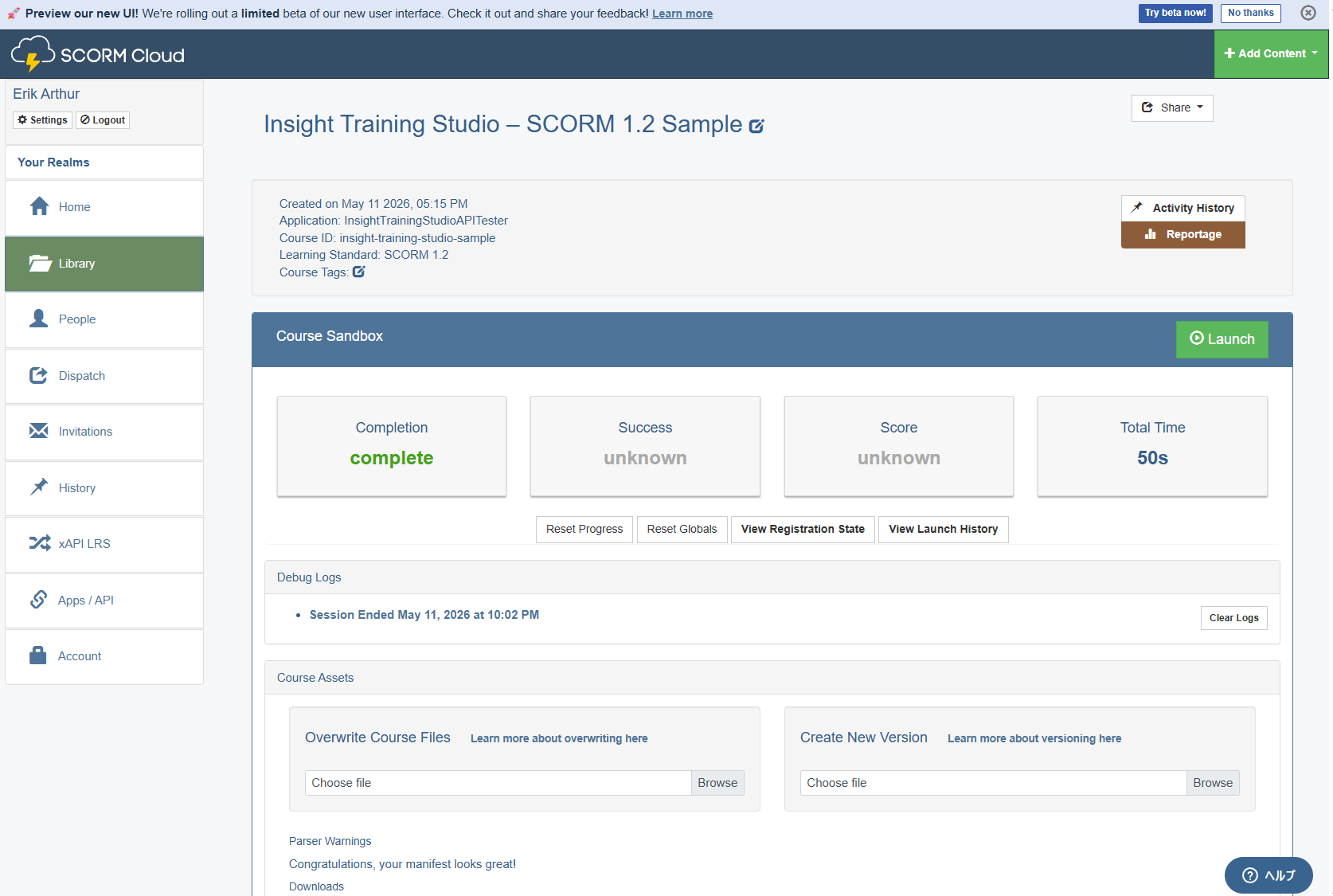
Verified on: May 11, 2026 · Standard: SCORM 1.2 · Tester: SCORM Cloud (Rustici Software)
Section 7
FAQ
Does it work with older LMSes?
Should I migrate to SCORM 2004 / xAPI?
How do I track multilingual training content?
Can I use SCORM's quiz features?
Is there a sample SCORM 1.2 package?
What exactly does "not verified with other LMSes" mean?
Try SCORM 1.2 package export with INMV
Drop a PowerPoint and produce a training video plus a SCORM 1.2 package from one desktop app. Same feature on Personal, Business, and Enterprise.
For joint verification inquiries, email info@h-insight.jp